
Review · ICE BAR & INDOOR ATTRACTIONS
Hologate VR – Multiplayer Virtual Reality
VR beats cabin fever on a rainy Queenstown day.
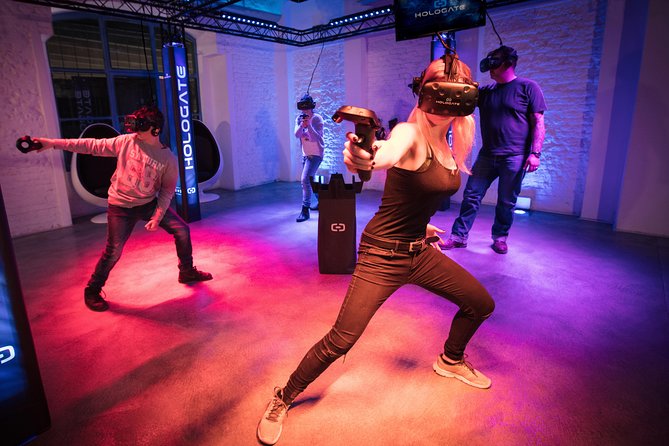
If you’re looking for an indoor plan that still feels like an adventure, Hologate VR Multiplayer at Thrillzone is built for action: you pick from a game menu, then play two games using your own body as the controller. The whole setup is designed so friends and family can jump in without lots of tech stress.
I like that Thrillzone staff help you choose games that fit your group, so the experience doesn’t turn into one person doing everything while others watch. I also like the fast pace: a session is short, but you still get two different game styles. One thing to consider is that this is physical VR—if anyone in your group is worried about movement, it’s worth letting staff know so they can steer you toward the right choices.
In This Review
- Key things to know before you go
- Where Holgate VR fits in Queenstown (and why it’s a smart rainy-day move)
- The 30-minute session: what the flow feels like
- Picking games with Thrillzone staff (how to get the best match for your group)
- “Your body is the controller”: how the VR control scheme changes everything
- The Thrillzone factor: why the staff support matters
- Multiplayer play you can enjoy as a family or a friend group
- Extras: green screen photos for purchase
- Value and price: is $34.13 for 30 minutes a good deal?
- Who should book Holgate VR in Queenstown?
- Quick practical notes that make your visit smoother
- Should you book Holgate VR at Thrillzone?
- FAQ
- How long is the Holgate VR multiplayer session?
- How many games do you play in one visit?
- Is gear provided?
- Where does the experience start?
- Is it suitable for kids and people with different abilities?
- Is there anything extra I should budget for?
Key things to know before you go
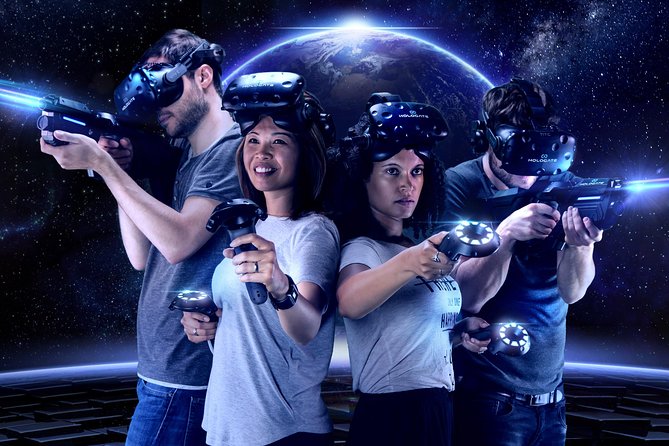
- Body-as-controller gameplay: you move to play, not just point and click.
- Two games per session: you get variety in about 30 minutes.
- Staff help with game selection: they’ll guide you toward good matches for your group.
- Multiplayer focus: it’s built for friends and families, not solo wandering.
- Gear is provided: you don’t need to bring anything VR-related.
- Green screen photos are extra: fun keepsake option, but not included.
Where Holgate VR fits in Queenstown (and why it’s a smart rainy-day move)
Queenstown has a way of tempting you outside even when the weather doesn’t cooperate. But when the mountains are calling and the clouds don’t cooperate back, Holgate VR at Thrillzone is a practical reset. It’s indoors, it’s short, and it still feels like you’re doing something new rather than killing time.
This is also a good option if your group can’t agree on one activity. Hiking, biking, river tours—fun, yes. But not everyone wants to be out in the cold or stuck with a schedule that runs long. A 30-minute VR session gives you a clean slot in your day, and it can match a wide range of comfort levels, since Thrillzone staff will talk you through game picks when you arrive.
You’ll be in Queenstown at 53 Shotover Street, right at Thrillzone. That matters because it keeps the experience simple: no long transfer, no complicated navigation, no waiting for a vehicle that might run late.
Other rainy-day rooms, from the Ice Bar to VR
- Queenstown: Minus 5 Ice Bar Experience with Drink Options
★ 4.7 · 592 reviews - Fear Factory Queenstown
★ 4.5 · 248 reviews - Queenstown: Ice Bar Entry with Warm Winter Gear and Drink
★ 4.8 · 162 reviews - Queenstown: Hidden Underwater Theatre Experience
★ 4.5 · 135 reviews
The 30-minute session: what the flow feels like
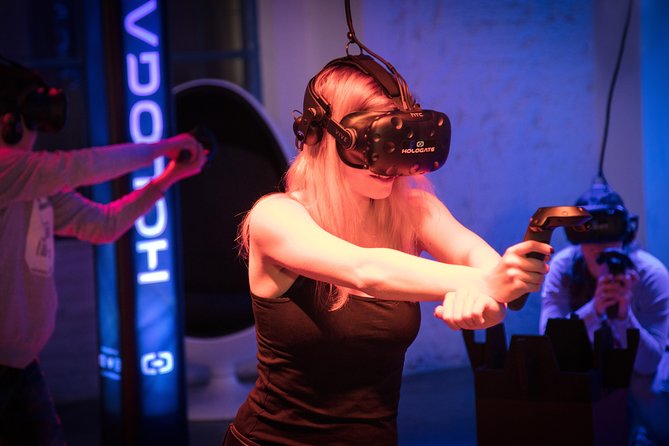
Think of your experience as a quick, structured burst of play rather than a long VR marathon. Each session runs about 30 minutes, and you’ll play two different games. The order is chosen as part of the experience planning, with staff discussing options on arrival to match your group.
Here’s what the flow is like in real-world terms:
- You start with a short orientation/talk-through.
- Then you head into your first VR game.
- When that wraps, you go into the second game.
- You finish back where you started.
That two-game setup is the big reason this works well. It avoids the common problem where you try one game, get the novelty, and then spend the rest of the time wishing there was something different. Instead, you get variety—often different gameplay styles (like a fighting scenario vs. a sports-style or rhythm-style challenge).
Picking games with Thrillzone staff (how to get the best match for your group)
One of the strongest parts of this experience is the way staff support your choices. You don’t just get a random selection and hope for the best. You’ll be guided to pick games that fit your group’s energy level and comfort with moving.
A helpful detail from the way people describe the experience: staff often give you a small set of options (like three games) and then help you choose. That’s a sweet spot. Too many choices can slow things down. Too few can feel limiting. A focused menu makes decision-making quick—especially with kids.
Game examples you might encounter include:
- a zombie battle scenario
- a snowball fight game
- a beat/rhythm challenge
Even if you don’t pick those exact titles, the key idea is that your session is built around varied scenarios. So you can steer toward what your group will enjoy most—whether that’s something chaotic and competitive, something playful and physical, or something timed and rhythmic.
Practical tip: if your group has mixed comfort levels (for example, one adult who wants action and a child who might be cautious), tell staff what you’re aiming for. The experience is designed for all ages and abilities, but that doesn’t mean everyone likes the same intensity. Staff can help you get the balance right.
“Your body is the controller”: how the VR control scheme changes everything

The big concept behind Holgate VR is that you don’t just wave a controller around. Your body acts as the remote. That changes the whole experience because it turns VR into something more like a game you play with your muscle memory—not just a screen you stare at.
What I like about this setup is that it reduces the barrier for first-timers. You don’t have to learn a complicated button layout before you can enjoy yourself. Instead, you follow what the game asks your body to do. It feels natural once you’re in the moment, especially during the early moments of each game.
It also makes multiplayer more fun. When multiple people are moving, reacting, and competing in the same space, the session becomes social in a real way—not just everyone wearing a headset and hoping they’re all having the same experience. That’s a big deal for families and friend groups.
Still, here’s the consideration: because it’s body-driven, it’s not a sit-down activity. If someone has limited mobility or gets uncomfortable with movement-based play, you’ll want to communicate that up front so staff can guide you toward game types that fit.


The Thrillzone factor: why the staff support matters

The “good VR” part is the tech. But the “great VR” part is what happens when you’re standing there wondering what to do next. Thrillzone staff handle that with friendly, hands-on help.
From how the experience is described, staff walk you through things before you start playing. People also note they were offered choices of games and that the staff were approachable and helpful. In a short session like this, that matters even more. You don’t want half your time spent figuring out how the system works. You want to start playing quickly and confidently.
If you’re going with kids, that support can be the difference between a session that feels fun and one that turns into a slow intro. If you’re going with adults, it still helps because it lets you get straight into the action instead of treating VR like a tech lesson.
Multiplayer play you can enjoy as a family or a friend group
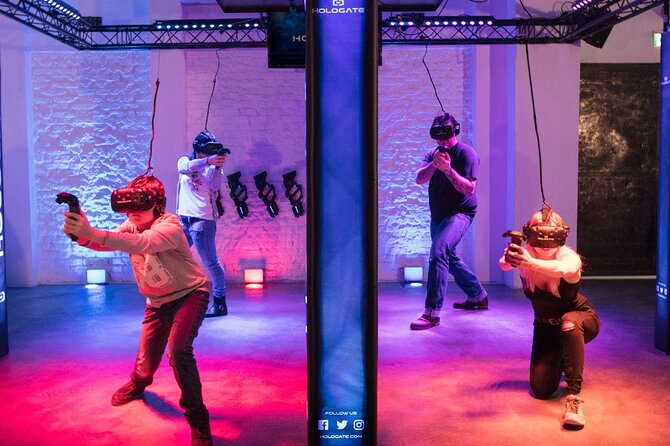
Holgate VR is built around multiplayer. That’s a big plus in Queenstown, where you often end up traveling in groups and trying to find something everyone will actually want to do.
Here’s why multiplayer matters for value:
- You get shared energy during the session.
- You don’t need to coordinate a complicated schedule outside.
- The room becomes a place you hang out and react, not just wait your turn.
This also fits the “all ages and abilities” claim in a realistic way. Multiplayer VR doesn’t automatically mean everyone must play the same intensity. With staff input and game selection, you can set the tone so the experience works for a broader range of people.
Extras: green screen photos for purchase

At this VR session, there are green screen photos available for purchase. That’s not included, so think of it as an optional keepsake if you want something to take home.
If you hate add-ons, you can skip it and still leave with a fun memory of two games in one sitting. If your group likes souvenirs, it’s a decent place to consider it because you’re already suited up in an event-like setting.
Value and price: is $34.13 for 30 minutes a good deal?
At $34.13 per person for about 30 minutes, it’s fair to ask whether this is “worth it” or just a novelty. Here’s my take based on how the session is structured.
You’re not paying for a single activity—you’re paying for:
- gear provided
- a short orientation
- two different games
- staff support to choose options that fit your group
- multiplayer play
In other words, you’re buying time-plus-structure, not just access to equipment. Many indoor activities charge for a time slot too, but they don’t always add variety or staff-guided game selection.
Also, Queenstown’s weather can force last-minute changes. If Holgate VR helps you turn a bad-weather afternoon into a fun, high-energy break, that value is real—even if the weather is exactly why you’re there in the first place.
One more value note: this is easy to slot into your itinerary. Most people can squeeze in a 30-minute activity without it taking over the day.
Who should book Holgate VR in Queenstown?
Book this if you want an indoor plan that still feels like play, not just a waiting game. It’s especially good for:
- families wanting something age-friendly and active
- mixed groups with different interests (you can use staff help to steer game choices)
- anyone who wants a short activity without a big time commitment
- friend groups who like competing and laughing together
Think twice if:
- someone in your group has mobility limitations that might make moving uncomfortable
- you only want a sit-down, low-motion activity
- you’re expecting a calm, quiet attraction—this is game-focused and physical
Quick practical notes that make your visit smoother
A few small things that help you enjoy the session more:
- Arrive a little early so you can get set up without rushing.
- Use the staff time to ask what game types are a good match for your group.
- Wear comfortable clothing that allows movement.
- If anyone is unsure about intensity, speak up early. Staff can guide you toward better choices.
Also, the experience is set up as a private activity for your group. That usually means you won’t be sharing your session with strangers, which helps with comfort and reduces waiting.
Should you book Holgate VR at Thrillzone?
I’d book it if you want a quick, structured indoor activity in Queenstown that gives you two chances to have fun, guided by staff, with gear provided. The body-as-controller setup makes it feel more like a real game than a passive tech demo, and the short time window makes it easy to fit into a day.
Skip it if your group wants something quiet or completely non-physical. VR games here involve movement, so it’s better for people who are okay being active for about 30 minutes.
If you’re in Queenstown with rain on the schedule, this is one of those rare options that doesn’t feel like a consolation prize—it feels like the plan.
FAQ
How long is the Holgate VR multiplayer session?
Each session is about 30 minutes, and it includes two games.
How many games do you play in one visit?
You play two different games per session.
Is gear provided?
Yes, all gear is provided.
Where does the experience start?
The meeting point is Thrillzone Queenstown, 53 Shotover Street, Queenstown 9300, New Zealand, and it ends back at the meeting point.
Is it suitable for kids and people with different abilities?
Yes. It’s described as suitable for all ages and abilities, and staff can help you pick games that fit your group.
Is there anything extra I should budget for?
Green screen photos are available for purchase, but they are not included in the base experience price.
More for a Wet Afternoon
- Queenstown: Minus 5 Ice Bar Experience with Drink Options★ 4.7 · 592 reviews
- Fear Factory Queenstown★ 4.5 · 248 reviews
- Queenstown: Ice Bar Entry with Warm Winter Gear and Drink★ 4.8 · 162 reviews
- Queenstown: Hidden Underwater Theatre Experience★ 4.5 · 135 reviews
Fresh on the Queenstown pages





Ice Bar & Indoor Attractions, compared.
 ★ 4.7Minus 5 Ice Bar Experience with Drink OptionsFrom $29592 reviews
 ★ 4.5Fear Factory Queenstown248 reviews
 ★ 4.8Ice Bar Entry with Warm Winter Gear and DrinkFrom $35162 reviews
 ★ 4.7Wanaka: Combo Entry to Puzzling WorldFrom $19153 reviews
 ★ 4.5Hidden Underwater Theatre ExperienceFrom $8135 reviews
 ★ 4.5COMBO Admission: Puzzling World, WanakaFrom $2085 reviews
 ★ 4.5Time Tripper QueenstownFrom $1280 reviews
 ★ 4.4Fear Factory Haunted House Admission TicketFrom $2367 reviews
Browse the lists this tour appears in